ASCIIGround (Development)
ASCIIGround


A TypeScript library for creating animated ASCII backgrounds.
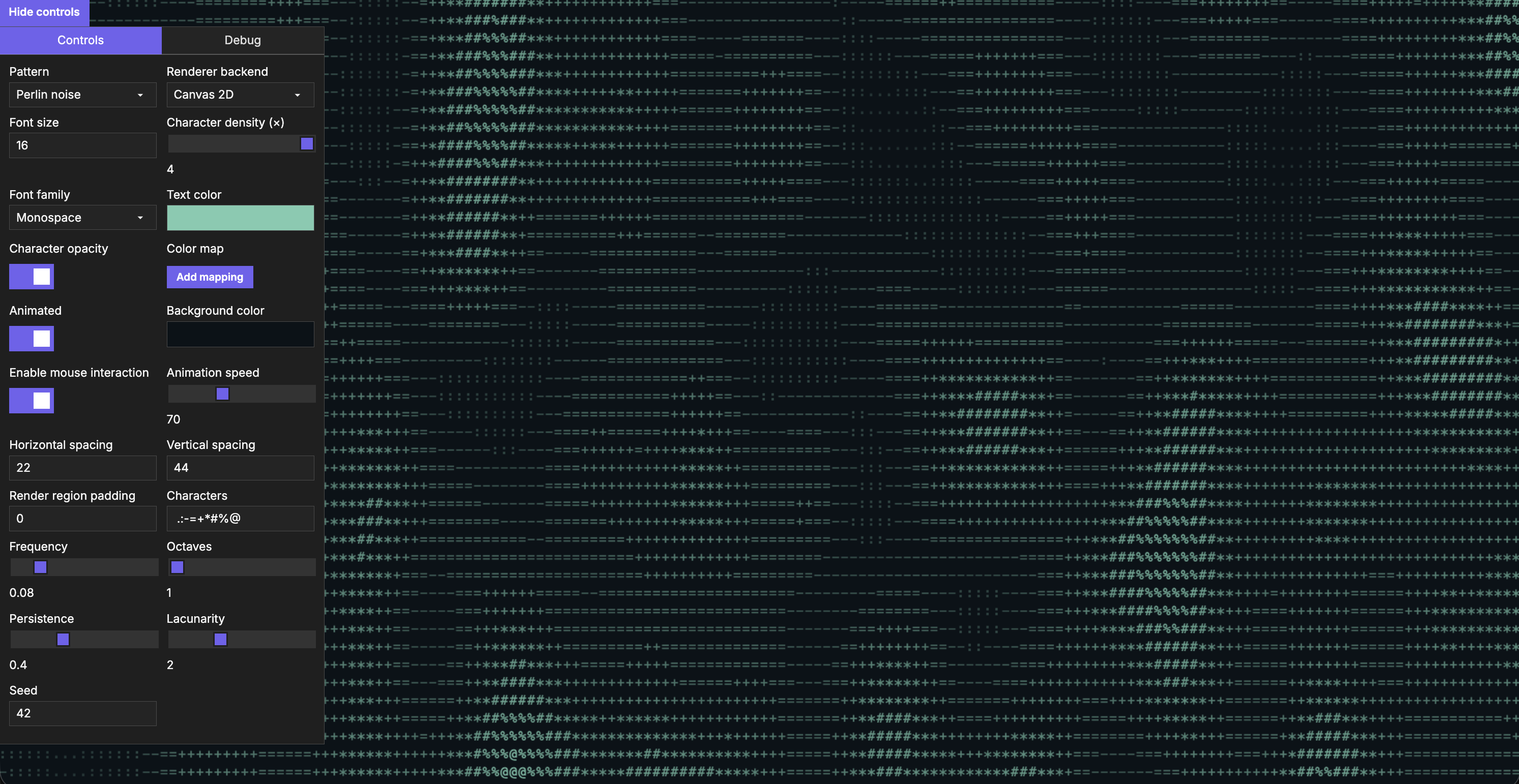
Features
- Multiple pattern generation implementations: Perlin noise, rain, static noise with extensible pattern system.
- Configuration options for font, animation speed, character sets, noise parameters, and much more.
- Support for 2D Canvas and WebGL rendering.
- Comprehensive API documentation.
- Mouse interaction support.
Installation
NPM
npm install asciiground
CDN
<script src="https://unpkg.com/asciiground@latest/dist/asciiground.umd.js"></script>
Quick start
Basic usage
import { ASCIIGround, PerlinNoisePattern } from 'asciiground';
// Acquire canvas element.
const canvas = document.getElementById('my-canvas') as HTMLCanvasElement;
// Create pattern instance.
const pattern = new PerlinNoisePattern({
characters: [' ', '.', ':', ';', '+', '*', '#']
});
// Create and initialize renderer.
// Notice that method chaining can be used for convenience.
const asciiGround = new ASCIIGround()
.init(canvas, pattern, { fontSize: 12, color: '#667eea' })
.startAnimation();
Switching patterns
import { ASCIIGround, RainPattern, PerlinNoisePattern } from 'asciiground';
// Acquire canvas element.
const canvas = document.getElementById('canvas') as HTMLCanvasElement;
// Create rain pattern instance.
const rainPattern = new RainPattern({
characters: ['|', '!', '1', ':'],
rainDensity: 0.8,
minDropLength: 8,
maxDropLength: 25,
});
// Create Perlin noise pattern instance.
const perlinNoisePattern = new PerlinNoisePattern({
octaves: 4,
frequency: 0.01,
persistence: 0.5,
lacunarity: 2.0,
characters: [' ', '.', ':', ';', '+', '*', '#'],
});
// Initialize ASCIIGround with rain pattern and custom renderer options.
// You don't need to start animation immediately, it can be controlled later.
const asciiGround = new ASCIIGround()
.init(canvas, rainPattern, { fontSize: 14, color: '#00ff00' });
// Switch to a new Perlin noise pattern.
asciiGround
.setPattern(perlinNoisePattern)
.startAnimation();
Rendering
// Use WebGL2 with automatic Canvas 2D fallback.
asciiGround.setOptions({ rendererType: 'WebGL' });
// Check the active renderer or switch back to Canvas 2D (the default).
console.log(asciiGround.options.rendererType);
asciiGround.setOptions({ rendererType: '2D' });
Switching renderers replaces the canvas. Use asciiGround.canvas to access the current element and reattach application listeners.
Character density and opacity
asciiGround.setOptions({
fontSize: 16,
charSpacingX: 22, // Fixed base spacing, independent of font size.
charSpacingY: 44,
characterDensity: 2, // Approximately twice as many grid positions. Default: 1.
enableOpacity: false, // Disable pattern fades. Default: true.
});
CDN usage
<!DOCTYPE html>
<html>
<head>
<title>ASCIIGround demo</title>
</head>
<body>
<canvas id="ascii-canvas" width="800" height="600"></canvas>
<script src="https://unpkg.com/asciiground@latest/dist/asciiground.umd.js"></script>
<script>
const { ASCIIGround, PerlinNoisePattern } = window.ASCIIGround;
const canvas = document.getElementById('ascii-canvas');
const pattern = new PerlinNoisePattern({
octaves: 4,
frequency: 0.05,
characters: [' ', '.', ':', ';', '+', '*', '#'],
});
const asciiGround = new ASCIIGround()
.init(canvas, pattern, { fontSize: 14 })
.startAnimation();
</script>
</body>
</html>
Available patterns
Perlin noise
Creates smooth, organic-looking patterns like clouds, terrain or flowing effects.
import { PerlinNoisePattern } from 'asciiground';
const pattern = new PerlinNoisePattern({
seed: 0,
octaves: 4,
frequency: 0.05,
lacunarity: 2.0,
persistence: 0.5,
characters: [' ', '.', ':', ';', '+', '*', '#', '@'],
});
Rain
Creates a downward flowing effect reminiscent of digital rain.
import { RainPattern } from 'asciiground';
const pattern = new RainPattern({
rainDensity: 0.8,
minSpeed: 0.5,
maxSpeed: 1.5,
minDropLength: 8,
maxDropLength: 25,
mutationRate: 0.04,
fadeOpacity: 0.2,
headColor: '#FFFFFF',
characters: ['|', '!', '1', ':'],
});
Static noise
Random noise effect for TV static or glitch aesthetics.
import { StaticNoisePattern } from 'asciiground';
const pattern = new StaticNoisePattern({
seed: 42,
characters: [' ', '.', '*', '#'],
});
Examples
Matrix-style rain
import { ASCIIGround, RainPattern } from 'asciiground';
const canvas = document.getElementById('canvas') as HTMLCanvasElement;
const pattern = new RainPattern({
rainDensity: 0.9,
minSpeed: 1.0,
maxSpeed: 2.5,
minDropLength: 3,
maxDropLength: 15,
fadeOpacity: 0.1,
headColor: '#FFFFFF',
characters: ['0', '1', '|', '!', ':', '.', ' '],
});
const asciiGround = new ASCIIGround()
.init(canvas, pattern, {
fontSize: 14,
color: '#00ff00',
backgroundColor: '#000000'
})
.startAnimation();
Animated perlin noise
import { ASCIIGround, PerlinNoisePattern } from 'asciiground';
const canvas = document.getElementById('canvas') as HTMLCanvasElement;
const pattern = new PerlinNoisePattern({
octaves: 3,
frequency: 0.02,
persistence: 0.4,
characters: [' ', '░', '▒', '▓', '█'],
});
const asciiGround = new ASCIIGround();
asciiGround
.init(canvas, pattern, {
fontSize: 12,
color: '#667eea',
animationSpeed: 0.5,
backgroundColor: '#1a1a2e',
})
.startAnimation();
API reference
Complete API documentation is available at https://eoic.github.io/ASCIIGround/api/.
The documentation includes:
- Complete class and interface references.
- Pattern creation guides.
- Configuration options.
- Interactive examples.
- Source code links.
Core classes
- ASCIIGround - main entry point for static and animated backgrounds, suitable for most use cases.
- ASCIIRenderer - renderer for full control over the rendering process.
- Pattern classes - PerlinNoisePattern, RainPattern, StaticNoisePattern.
- Custom patterns - extend the Pattern base class to create your own unique effects.
Development
git clone --branch development https://github.com/Eoic/asciiground.git
cd asciiground
nvm use
npm ci
npm run dev
npm run check # Lint, tests, type checking, and builds
npm run test:watch # Tests in watch mode
npm run build # Library → dist/
npm run build:demo # Demo → docs/demo/
npm run build:docs # API documentation → docs/api/
See Contributing for the development workflow and Publishing for releases and repository setup.